Unleash Your Handwriting: Create Your Own Font on the iPad
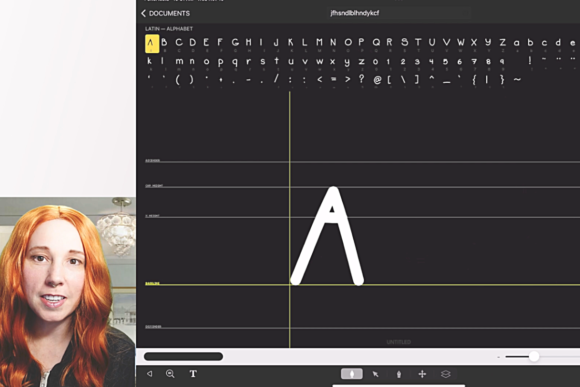
There’s a unique power in seeing your own handwriting transformed into a functional typeface. It’s no longer just a scribble in a notebook; it becomes a design asset, a tool for communication, and a direct extension of your creative voice. For many, the idea of font creation seems reserved for technical experts with expensive software. However, with Create Your Own Font on the iPad, that barrier dissolves. This class, guided by digital artist Genevieve Mazer, walks you through the entire process using the intuitive iFontMaker app, turning your personal script into a polished, usable font file.
The visual character of a font born from this process is inherently personal and organic. Unlike sterile, geometric sans serif fonts or perfectly polished script fonts, a handmade typeface carries the subtle imperfections, pressure variations, and flow of natural handwriting. It feels authentic, approachable, and human. This quality is its greatest strength. The resulting font isn’t trying to be something it’s not; it’s a direct digital translation of your unique touch, making it an ideal choice for projects where personality and connection are paramount.
Where Your Personal Typeface Truly Shines
Understanding where a handwritten font like this excels is key to using it effectively. Its casual, personal nature makes it a fantastic choice for applications where you want to break down formality and build rapport with your audience. Think about logo design for a boutique bakery, a freelance illustrator, or a personal coaching service. Your font becomes the brand’s signature, instantly recognizable and impossible to replicate. It’s perfect for social media graphics, adding a layer of authenticity to quotes, announcements, and stories that a standard system font cannot provide.
For editorial design and publishing, consider using it for chapter titles, pull quotes, or author notes in a book or magazine. It creates a beautiful contrast against a clean body text, adding visual interest and guiding the reader’s eye. In packaging design, a custom handwritten font can convey artisanal quality and care, making a product feel more special. Even in digital spaces like web design, it can be used sparingly for headlines or calls-to-action to inject warmth and personality into an otherwise structured layout.
From Personal Project to Professional Asset
The journey from sketch to final font file is where the real learning happens. Genevieve Mazer’s step-by-step instruction demystifies the editing of each glyph—the individual letters, numbers, and symbols. You’ll learn how to refine letter spacing (kerning) and ensure consistent line height, which are critical for readability. A beautifully crafted creative font is useless if the letters collide or the words feel cramped. This class focuses on practical corrections that elevate your font from a simple digitized script to a professional tool.
The influence on brand perception is significant. Using a font you created yourself signals authenticity and attention to detail. It tells your audience, “This is made with care.” For a small business owner or entrepreneur, this contributes directly to a cohesive brand identity. It ensures consistency across all your materials—from your website header to your thank-you notes—reinforcing recognition and professionalism. The font becomes a core part of your visual language.
When evaluating if this style fits your project, context is everything. Ask yourself: Does my brand voice need to feel warm, personal, and approachable? Am I trying to stand out from corporate competitors? A handmade font is a display font at heart; it’s designed for impact in headlines and short bursts of text, not for long paragraphs of body copy. Test it thoroughly. Try pairing it with a simple, neutral sans serif font or a classic serif font for contrast. The included font file you download after the class allows you to experiment freely in your own design software.
Finally, practical considerations matter. Always review the licensing included with your finished font. For personal use in projects like wedding invitations or personal blogs, it’s typically straightforward. If you plan to use it commercially—in products for sale, client work, or widespread marketing—confirm the terms. This class provides a font for you to download, giving you a tangible asset to start using immediately. Create Your Own Font on the iPad is more than a lesson; it’s a gateway to adding a truly unique and valuable element to your design assets toolkit, empowering you to leave your mark in a distinctly personal way.